Can Gemini Edit PDF? We Tested an Uploaded File
 Productivity
Can Gemini edit PDF files you upload? Our test, what Google confirmed on web and mobile, the limits and the free-plan catch.
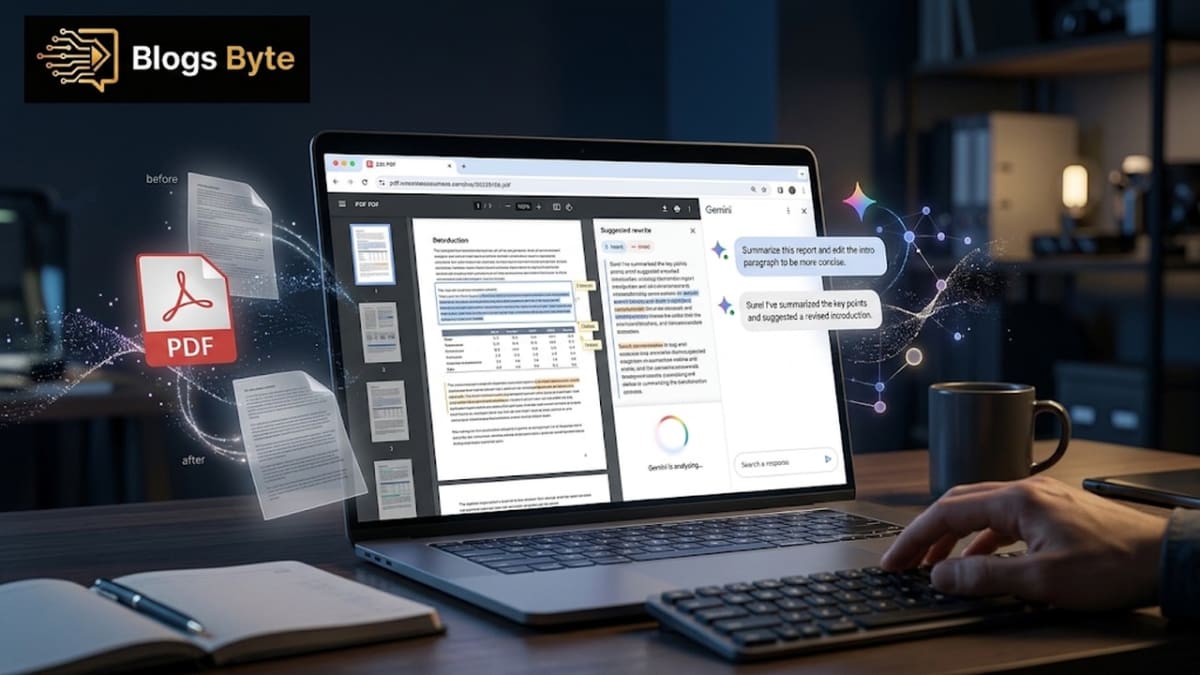
For years, fixing one wrong word in a PDF meant a small headache: find a converter, upload the file somewhere, fight the layout, download it, and hope nothing moved. Can Gemini edit PDF files now? Yes: you can edit PDF in Gemini without leaving the chat. You open the file, tap the text, and type.
Google announced it on October 29, 2026. The idea is simple. Gemini can already write documents for you. Now it can show them in the chat, let you change them by hand, and let you ask for changes by pointing at a sentence. It works on the web and on phones, and Google says it is available to everyone who can use the Gemini app. It is a friendlier kind of AI news than the Gemini API price increase, which will raise costs for developers from December 1.
The open question is how far that goes, especially with a PDF that Gemini did not write. So we tested it, and below is exactly what happened and what we do not know yet.
What Google actually announced
Straight from Google's own post: you can now generate, preview and edit documents, PDFs, presentations, spreadsheets, code and more, directly in the Gemini app.
Here is what you can do once a file is open in the chat:
- Go full screen and type edits directly into the file.
- Highlight text and ask Gemini a question about it.
- Ask Gemini to refine a section, a table or a visual.
One example in the announcement is worth remembering. Google shows someone asking Gemini to turn handwritten lecture notes into a PDF study guide, then editing it by hand and highlighting parts to have Gemini fix. If you study from notes, this is the use case that matters most. We came across the same idea when we compared NotebookLM vs ChatGPT for studying and research, where the real question was how well each tool works from your own material.
Gemini edit PDF on mobile: can I do it on my phone?
Yes, with a catch. According to Google, PDF preview and editing work on both the web and mobile. Every other format, meaning Google Docs, Sheets, slide decks, Markdown files, text files and code, is web only for now.
So if you want to fix a PDF while you are on a bus, the Gemini app can do that. If you want to change a spreadsheet in the chat, you need a browser. Google has not said when other formats will reach mobile. And if all you have is photos of a page, a JPG to PDF tool can pack them into one file first.
Can Gemini edit PDF files you upload? What we tested
Every example Google gives involves a file that Gemini has just created. That left one question unanswered, and it is the one most people will ask: can it edit a PDF that was made somewhere else?
Some write-ups say it is unclear. At least one says it only works on files Gemini generates. So we tried it ourselves.
We uploaded an ordinary account statement PDF, opened it in the editor and typed one word, "Hello", at the top. The word appeared in the document, in place, as normal text. That is a single test on a single text-based PDF, so it is not proof that every PDF behaves the same way. But it shows that an uploaded PDF can open in the editor and take typed text. That alone contradicts the claim that the editor works only on files Gemini wrote.
Two honest warnings. First, we typed text only. We did not test deleting text, changing fonts, moving images or editing scanned pages. Second, a bank statement is a very private file. Do not upload anything sensitive to an AI chat unless you are sure you are comfortable with it. Use a harmless sample file when you try this yourself. We also did not test locked files; if a file you own has a password and you have the right to open it, remove the password first with the PDF password remover.
What "edit" means here: a quick map
The word covers three different actions, and it helps to keep them apart. First, you can type directly into the file in full-screen view, which is a manual edit with no AI involved. Second, you can highlight a passage and ask Gemini to rewrite it or answer a question about it, which is an AI edit. Third, once the file looks right, you can export it, and Notebookcheck reports that a finished PDF can also be saved to Google Drive.
On a phone the picture is simpler. According to Notebookcheck, the Android and iOS apps can only edit PDFs, while Google Docs, Sheets, slides, Markdown, text and code files work only in the web version at gemini.google.com.
Gemini PDF editor free: do you need to pay?
Google says the feature is available to all users in all languages where the Gemini app is available, and nothing in the announcement ties it to a paid plan. So yes, a free Gemini PDF editor is on offer in the sense that you do not need a subscription for the editor.
There is one wrinkle. Notebookcheck, which tested the editor with a free account on November 1, notes that Google has limited the models free users can pick since October 9, and gives no details on which models are restricted or what the usage limits are. So free is free, but how many edits you can make before hitting a limit is not spelled out.
This is the kind of detail that changes quickly with Google's AI products, as the Gemini API price increase showed, with rules changing on a set date. Check what you get on your account instead of assuming. Free AI features like this are spreading through everyday tools, which is the story in real world applications of AI.
What it cannot do (as far as anyone can tell)
- It is not a full desktop PDF editor. Nobody has shown it handling complex layouts, forms with fields, or heavy design files. Treat it as a quick fix tool, and if you need to join files first, use Merge PDF.
- Word and Excel are missing. The list of editable formats does not include DOCX or XLSX. One write-up suggests working around that by creating a Google Doc or Sheet and downloading it as Word or Excel. If your file is Markdown, our guide to opening an MD file in Google Docs shows another route.
- Saving needs care. Notebookcheck reports that a finished PDF can be exported or saved to Google Drive. Google's post does not explain whether edits made in the chat change the file you uploaded, so do not assume your original has changed.
- Accuracy needs checking. When you ask Gemini to rewrite a section, it can change more than you intended, and turning handwriting into text can introduce mistakes. Read the result before you send it.
That last point is not a Gemini problem alone. It is how these models work, which we explain in how AI actually works.
A safe way to test it yourself
If you want to see whether the editor works on your own kind of file, treat it like an experiment, not a work task.
- Pick a harmless sample. A recipe, a flyer or a public report is fine. Leave out statements, contracts and ID scans.
- Edit a copy. Keep the original in a separate folder, untouched.
- Start with one manual change. Type a single word in full-screen view and check that it lands where you expect.
- Then try one AI edit. Highlight one sentence and ask for a shorter version. Compare it with the original word by word.
- Look at the layout. Check that fonts, spacing, images and page breaks still look right.
- Export and open the result in a normal PDF viewer on another device, because that is how your recipient will see it.
If any step goes wrong, you have learned the limits of the tool on a file that did not matter.
Gemini edit Google Docs and other formats
The same editor handles Google Docs, Sheets, slides, Markdown, text and code on the web. If you already live in Google's tools, this closes a small gap: you ask for a draft, tweak it, and move on without switching tabs.
It also fits what Google has been doing elsewhere. If you want the "AI that works in the background of your day" angle, Google AI Edge Foresight looks at a note taker that works offline.
When a normal PDF tool is still better
Be fair to the old tools. If you need to remove a password, merge files, turn pages into pictures or build a PDF from photos, a plain tool is faster and does not send your file anywhere.
Our free tools run in your browser, which means the file stays on your own device:
- To open a locked file you have the right to open, use a password remover.
- To combine several files before you edit them, use a merge tool.
- To get a page as a picture, use the PDF to image converter.
- To build a PDF from phone photos, use a JPG to PDF tool.
Use Gemini for the small edit. Use a plain tool for the mechanical jobs. A good rule of thumb: if the job is "change what the words say," Gemini is a fair choice. If the job is "change the file itself," such as joining, locking, unlocking or converting, a dedicated tool is safer and faster.
Privacy questions to ask before you upload a file
Editing in a chat means the file goes to an online service, so ask the same questions you would ask of any upload. What does the service store, and for how long? Can you delete the chat and the file afterwards? Does the service use your content to improve its products, and can you turn that off in your account settings? Read Google's own privacy and Gemini activity settings for your account, because defaults and options can differ by country and account type.
For files with personal or financial details, the safest answer is to avoid uploading them at all. A browser-based tool that works on your own device does the mechanical jobs without sending the file anywhere, and why most people use AI wrong covers a few simple habits for deciding what an AI chat should and should not see.
How to get the best result without making a mess
Keep the request small. "Make this paragraph shorter" works better than "improve this document." Edit one section at a time, so that if something goes wrong you know exactly where. And remember that the same tool that fixes your typo can also quietly change a number, so the final read is always yours. Check numbers, dates and names after every rewrite. Keep your original file untouched, and edit a copy. If you are not sure how to word a request, why most people use AI wrong has plain advice on asking AI for exactly what you need.
What to watch next
Several questions are still open, and each one would change how useful the editor is. Will Google bring Docs, Sheets and slide editing to the mobile apps, or keep them on the web? Will it say which model handles the edits for free accounts, and how many edits count against a daily limit? Will it explain what happens to the original when you edit an uploaded file? And will it open the editor to more formats, such as Word and Excel, so people do not need a workaround?
Until Google answers, the sensible position is to treat the editor as a convenient extra for small fixes, not as a replacement for the tools you already trust. Check the Gemini app's own help pages and this article's date before you rely on any limit mentioned here, because AI features change quickly.
The bottom line
You can edit PDF in Gemini now, and it is a real, useful feature: type changes by hand, highlight text to ask for edits, and do it on both web and mobile. In our own test, an uploaded PDF opened in the editor and accepted typed text, even though Google's examples only show files Gemini creates. Google says it is free for all Gemini users, but it does not give limits, saving rules or a list of what it cannot handle.
The practical rule: use it for quick, low-risk changes on files you do not mind sharing. Keep the original. Check every number. And for private or complex documents, a dedicated tool is still the safer choice.
FAQs
Can Gemini edit PDF files?
Yes. Since October 29, 2026, Gemini lets you preview and edit PDFs inside the chat on both web and mobile. You can type changes directly or highlight text and ask Gemini to change it.
Can Gemini edit an uploaded PDF?
In our test, an uploaded text-based PDF opened in the editor and accepted typed text. Google's own examples only show files Gemini creates, and it does not say whether every uploaded PDF works, so test with a harmless sample first.
Is the Gemini PDF editor free?
Google says the feature is available to all users in all languages where the Gemini app is available, without tying it to a paid plan. Free accounts may still hit usage limits, which Google has not detailed.
Can I edit PDF using Gemini on my phone?
Yes. PDF editing works on the Gemini mobile apps. Other formats such as Google Docs, Sheets and slides are web only for now.
Can Gemini edit a scanned PDF?
We did not test that, and Google does not say. Turning handwriting or scanned pages into text can introduce mistakes, so check the result carefully.
Does Gemini AI edit PDF files saved in Google Drive?
Notebookcheck reports that a finished PDF can be exported or saved to Google Drive. Google does not explain whether editing in the chat changes the file you uploaded, so keep your original safe.
Does Gemini edit PDF files on iPhone?
Yes, in the Gemini app. Notebookcheck reports that the Android and iOS apps can only edit PDFs. Other file types such as Google Docs, Sheets and slides are web only for now.
Can I save an edited PDF from Gemini?
Notebookcheck reports that the finished PDF can be exported or saved to Google Drive. Google does not explain whether editing in the chat changes the file you uploaded, so keep the original as it is.
Can Gemini edit Word or Excel files?
Not directly. Word and Excel are not on Google's list of editable formats in the chat. One workaround is to create a Google Doc or Sheet in Gemini and download it as Word or Excel.
Blogs Byte explains AI, software and productivity in plain English, and builds free browser-based tools.